Activity reports
In this article you will Visualise DBMail login activity with Grafana and SQL. You will also learn how to safely and securely export DBMail's data for use by any report writer that can use SQL.
Securely allow access to database tables
Grafana needs access to data in DBMail. For security, flexibility and good practice this is best achieved by creating a group, a role in database speak, a user that belongs to that group (role), then granting access to the group role.
Start by creating a report group (dbmailreports) that cannot log in, then a user (grafanareader) that can login and assign them to the report group (dbmailreports). You need to allow the report group (dbmailreports) to CONNECT to the dbmail database then access (SELECT) the login time and status in the dbmail_authlog table.
CREATE ROLE dbmailreports WITH NOLOGIN;
CREATE ROLE grafanareader WITH LOGIN IN GROUP dbmailreports PASSWORD 'password';

GRANT CONNECT ON DATABASE dbmail TO grafana;
GRANT SELECT (login_time, status) ON dbmail_authlog TO dbmailreports;
Although this may appear convoluted, database security through group and individual roles is a clean and easy way to safely manage access for users to required data and prevent access to sensitive data.
As a database administrator you have access to all the data in the dbmail_authlog table, the grafanareader user has read only access (SELECT in database speak) to the login_time and status columns via the grafana group role. If you wanted to grant them access to any other columns then list them in the GRANT SELECT.
There is a school of thought that access to data should only be granted via database views, the following is that alternative.
CREATE VIEW dbmail_authlog_view AS
SELECT login_time, status
FROM dbmail_authlog;

GRANT SELECT ON dbmail_authlog_view TO dbmailreports;
Understanding the data
There are three type of record in dbmail_authlog, "active" where a user is actively using DBMail, "closed" where a session has finished, and "failed" where a login attempt failed. The following Graphana graph visualises these activities:
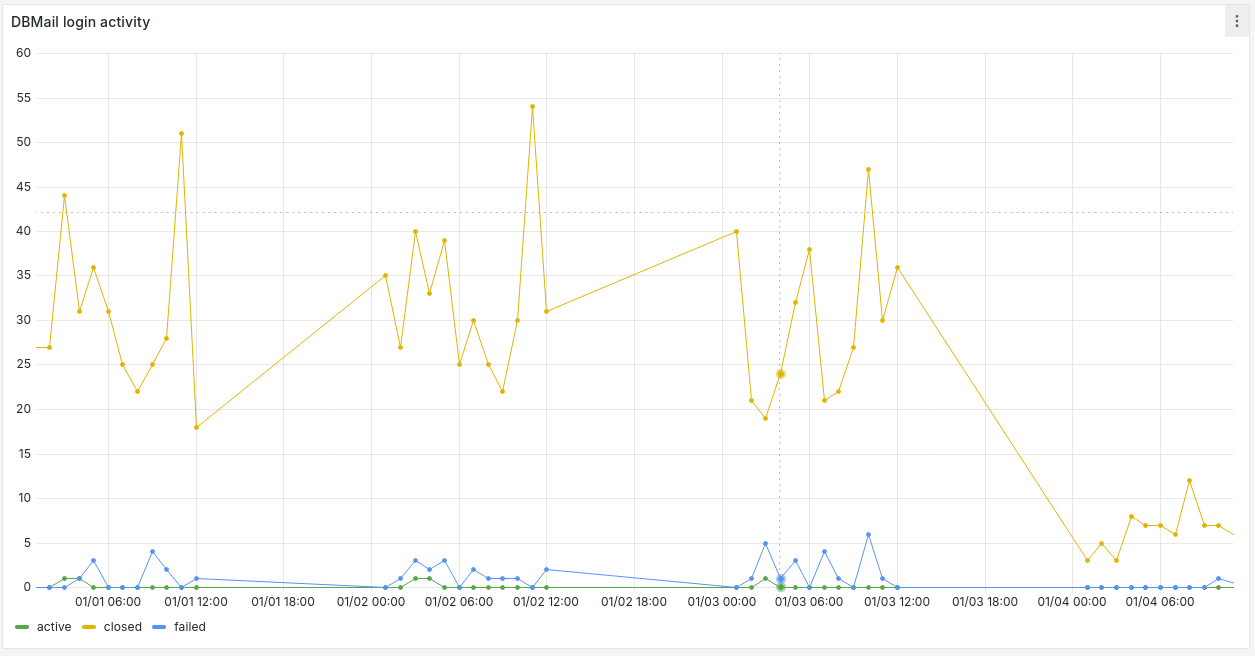
The above graph used the following query:
SELECT to_char(login_time, 'yyyy-mm-dd hh:mi:00')::timestamp AS login_time,
  SUM(CASE status
    WHEN 'active' THEN 1
    ELSE 0
  END) AS active,
  SUM(CASE status
    WHEN 'closed' THEN 1
    ELSE 0
  END) AS closed,
  SUM(CASE status
    WHEN 'failed' THEN 1
    ELSE 0
  END) AS failed
FROM dbmail_authlog
WHERE $__timeFilter(login_time)
GROUP BY 1
ORDER BY 1
For MySQL use the following for login_time:
str_to_date(date_format(now(), '%Y-%m-%d %H:%i:00'), '%Y-%m-%d %H:%i:00') AS login_time
Expanding reports
There are many useful tables including dbmail_users for a list of users and when they last logged in, dbmail_aliases for email addresses and the accounts they belong to, dbmail_mailboxes for mail folders, and sieve scripts.
DBMail is well organised and easily queried using ordinary SQL.